Professional skill suite
A collection of Claude skills I built to make the recurring work of consulting, sales, account management, and delivery more consistent and less manual.
The problem
A lot of professional work follows familiar patterns. Account plans need updating, proposals need shaping, meetings need documenting, and project results need turning into stories that other people can understand.
Each task requires context, careful writing, and a consistent standard. Repeating the process manually takes time, while rushing it creates gaps, inconsistent documents, and details that aren't supported by the source material.
I started building skills to handle more of that work, from gathering information and structuring documents to checking the finished output.
The approach
- Start with the source material. Skills gather information before drafting and make missing details visible, leaving gaps open for a person to settle
- Build around the actual deliverable. Each skill has a defined output, whether that's an account plan, proposal, presentation, SOW, or project story
- Keep the work connected. Skills pass information to one another so an account conversation can feed a plan, a proposal, and eventually a case study
- Keep people involved. Drafts are reviewed before documents are built or shared, and nothing sends automatically
- Make the process repeatable. Shared templates, checks, and working practices keep outputs consistent across sessions
The result
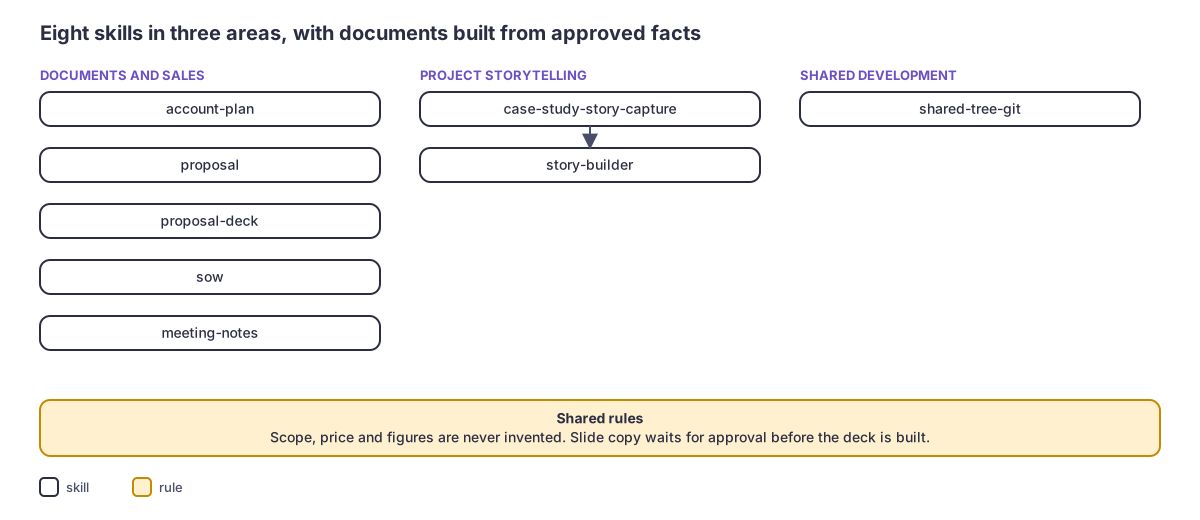
Eight selected skills across three areas: professional documents and sales, project storytelling, and shared development work.
| Area | Skills |
|---|---|
| Documents and sales | Account plan, proposal, proposal deck, SOW, meeting notes |
| Project storytelling | Case study story capture, story builder |
| Shared development | Shared tree Git |
Documents and sales
These skills handle the written work that supports client relationships, opportunities, and delivery. They share a common approach: gather the facts, organize them into the right format, make gaps visible, and give the person a chance to review the work.
Account planaccount-planA reusable account plan that carries forward what is still current and makes changes visible from one planning cycle to the next.
Overview
The skill gathers account information from existing documents and live sources, updates the plan, and keeps previous quarterly editions intact. It can also incorporate planning-call transcripts as proposed edits and answer questions about account staffing and project status. Figures come from checked calculations.
Where a person stays in control
- Names the client and says whether to use only known material or gather fresh
- Confirms whether the account objectives are still current or a new planning cycle has begun
- Answers the batched gap questions once, at the end of gathering
- Approves each edit when a planning call is layered into the plan
What runs on its own
- Reads every source before writing and says which sources it could not reach
- Carries forward every value that is still true and flags only the values likely to be stale
- Quotes every figure from checked calculations and never rebuilds a number in prose
- Keeps process narration out of the file, so the sheet holds only the account's own content
- Writes each first step of a recommendation as a dated row in the open action items
ProposalproposalA proposal builder with a readiness check that helps establish whether an opportunity is ready for a proposal or needs more work first.
Overview
It creates story-driven Word proposals, cleans up existing drafts while preserving their wording, and identifies missing information around opportunity readiness. Scope, pricing, staffing, and case studies come from supplied or approved sources. The result is a proposal that stays connected to what the client actually discussed.
Where a person stays in control
- Picks proposal, readiness check or clean-up
- Supplies the notes, the pricing, the team and any proof points to use
- For readiness, provides the account strategy document and the opportunity stage
- Approves the preview
What runs on its own
- Stops a readiness run at an earlier sales stage, saying the account strategy document is the right artifact there
- Treats the team's own judgment calls, such as right to win and investment, as named open questions when the source is silent
- Keeps a fact in the one section that owns it
- Sends a deck request to the proposal-deck skill and a contract request to the sow skill
Proposal deckproposal-deckA PowerPoint builder that separates the writing and design stages.
Overview
The skill first creates slide copy in Markdown, allowing the content to be reviewed independently of the presentation. Once approved, it builds the deck and checks the rendered slides before delivery. It supports proposal, proposal-review, and pitch decks, with speaker notes and a record of any visual checks that couldn't be completed.
Where a person stays in control
- Chooses the deck type and supplies the client, the price and the team
- Selects the case studies from the active list
- Corrects the copy and says "build it"
What runs on its own
- Asks for any computed or inferred fact and never asserts it
- Writes each slide to the density of the matching example copy
- Attaches speaker notes to every slide after the cover, unless the copy turns them off
- Reports any visual check it had to skip, with the reason
- Lists the gaps the deck carries in the delivery message
SowsowA statement-of-work builder designed around the importance of getting scope and pricing right.
Overview
It supports new SOWs, next-phase SOWs, and cleanup of existing drafts. Workstreams, deliverables, roles, and other claims are checked against their source material. Missing information stays visible for review, and the document isn't built until unresolved items have been addressed.
Where a person stays in control
- Chooses new SOW, next-phase SOW or clean-up
- Supplies the notes, the cost details and the team
- Decides which of two disagreeing sources is right
- Keeps or removes each untraced item, naming its source when kept
- Approves the preview before the file is built
What runs on its own
- Leaves a visible content-needed marker where a source says nothing, except that cost and team are always asked for and never filled in
- Treats a date, duration or count derived from other facts as a gap and asks
- Never asserts a workstream's current phase from the predecessor's forecast alone
- Never overwrites a file
- In a clean-up, changes no wording and drops no section
Meeting notesmeeting-notesA meeting documentation skill that turns transcripts and rough notes into structured, useful documents.
Overview
It supports meeting recaps, sales and pipeline updates, project kickoff briefs, and account strategy readouts. Decisions, numbers, owners, and action items are organized so someone who missed the meeting can understand what happened and what needs to happen next.
Where a person stays in control
- Supplies the transcript or notes and names the account or project
- Gives titles for attendees outside the organization
- Shares earlier briefs or the account plan for a kickoff or account strategy
- Answers the type question when the source is ambiguous
What runs on its own
- Merges related remarks from different speakers into one conclusion with its reason
- Groups action items under one heading per owner, with work for everyone under "All"
- Quotes exactly or writes no quote
- Leaves out a date or a reason for the meeting when the source gives none, and reports a date conflict in the reply
- Drops whole low-value items before it shortens any item
Project storytelling
These two skills turn project work into clear, reusable evidence. They connect the original delivery information to the stories and presentations used to communicate its value.
Case study story capturecase-study-story-captureA research and evidence-gathering skill that brings project information together before a case study is written.
Overview
It gathers facts from connected sources, transcripts, and stakeholder responses, then proposes business outcomes for review. Each outcome is classified as either Demonstrated or Enabled, distinguishing measured results from capabilities the work made possible. Nothing is saved as final until the person approves it.
Where a person stays in control
- Chooses how to start and names the project and likely sources
- Keeps, edits or drops each proposed outcome
- Answers the open questions once, in any order
- Says ship, then uploads the file and sends it
What runs on its own
- Reads connected sources before asking any question
- Labels each outcome Demonstrated when the facts show it or Enabled when the work created a capability that no figure measures yet
- Counts only the delivery team's own work
- Keeps unanswered questions in a separate list outside the document
- Never writes a placeholder or an invented detail into the notes
Story builderstory-builderA writing and presentation skill that turns approved project evidence into a consistent case study.
Overview
It creates project write-ups and presentation copy from the same approved story, keeping the two aligned. Each fact carries its source and evidence grade. Business outcomes are separated from delivery activity, and unsupported or caveated figures are labeled as such.
Where a person stays in control
- Supplies the story captures and names the output
- Reviews the story card and decides which parts stay
- Adds what changed for the client when no source says it
What runs on its own
- Grades every fact and flags any fact without a source as a gap
- Separates outcomes from activity, using activity counts only as proof
- Keeps caveated figures in the write-up and off the slides
- Names the calculation behind any combined figure
- Reuses the approved story's sentences across both outputs
Shared development
How the skills work together
The account plan provides the foundation for an ongoing client relationship. Meeting notes capture the conversations that update it. When an opportunity develops, the proposal skill checks readiness and prepares the written proposal. The proposal deck then turns approved content into a presentation, while the SOW defines the agreed scope.
As projects progress, case study story capture gathers the evidence of what was delivered. Story builder turns that evidence into a reusable project story and presentation material.
Shared tree Git supports the development environment behind the collection, keeping parallel sessions from interfering with one another.
The same principles run throughout: work from real information, keep gaps visible, preserve the source material, and leave important decisions with a person.
Stack
Claude Code skills, Python, Word and PowerPoint generation.
Evidence
Eight skills selected from a larger 19-skill collection.
Links
Source: private repository.