OliverOperate
A human-directed growth operation that coordinates sales development and marketing, from prospect outreach and follow-ups to content planning and reporting.
The problem
Automated sales outreach has become easy to recognize. Messages arrive from unfamiliar sender addresses, lack a proper signature, use awkward formatting, or read like generic templates. Follow-ups feel disconnected from the original message. The shortcuts are visible to the person receiving them, and they can undermine the credibility of the company sending them.
At the same time, running business development manually creates a job of its own. Someone has to maintain prospect records, prepare outreach, remember follow-ups, monitor replies, track delivery, coordinate marketing activity, and keep everything moving alongside the rest of the business.
I built OliverOperate to address both problems. I wanted the operational consistency of an automated growth process without making the company's communication feel automated.
The system takes responsibility for the coordination and repetitive execution behind sales development and marketing. The operator remains responsible for the decisions that represent the business: who to approach, what to say, what to publish, and how to build relationships.
The operating model
OliverOperate connects sales development and marketing through scheduled workflows, shared records, and operator-controlled approvals.
The operator supplies the prospects, company knowledge, messaging, and content. The system organizes that input, coordinates recurring activity, manages the steps between human decisions, and maintains records of what happens.
The distinction is deliberate. The system doesn't independently source prospects, conduct company research, generate lead lists, write original company messaging, or manage relationships. It provides an operating structure for carrying out those responsibilities consistently.
Sales development
A five-touch outreach sequence
The sales pipeline coordinates a five-touch email sequence. Each touch has a defined purpose and uses messaging written and maintained by the operator.
| Touch | Purpose |
|---|---|
| 1 · Introduction | A problem-aware introduction, with multiple message variants |
| 2 · Relevant insight | A follow-up built around a data point or relevant research |
| 3 · Social proof | A follow-up referencing team outcomes |
| 4 · Case study | A company-specific observation and relevant case study |
| 5 · Close the loop | A final follow-up that leaves the door open |
The operator develops the messaging and supporting research. The system selects an established template variant for each prospect, keeps that selection consistent, and fills in defined prospect details. The approved copy is used rather than having an LLM rewrite the initial message.
That decision reflects the original problem I wanted to solve: outreach should represent the company, not advertise the automation behind it.
Messages are delivered through the company's Outlook mailbox using Microsoft Graph. This gives the workflow a connection to the company's existing email environment rather than relying on an unrelated sender account. The intention is to make outreach consistent with normal business correspondence, including the sender identity and presentation, rather than the familiar signs of hastily assembled automated email.
Review before sending
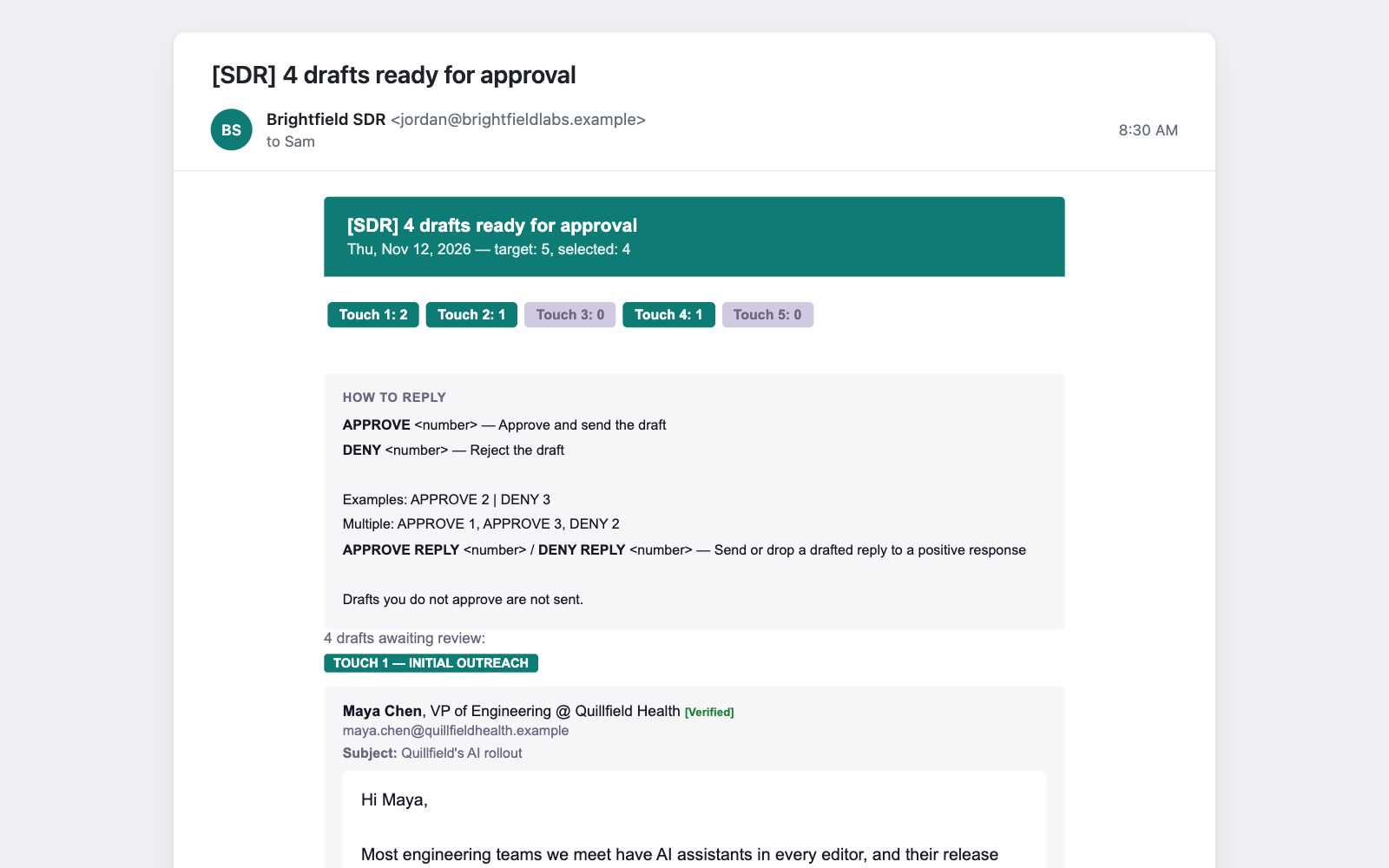
Each day, the system prepares eligible first-touch and follow-up drafts and sends the operator an approval digest. The digest organizes messages by touch and includes the exact subject and body proposed for delivery.
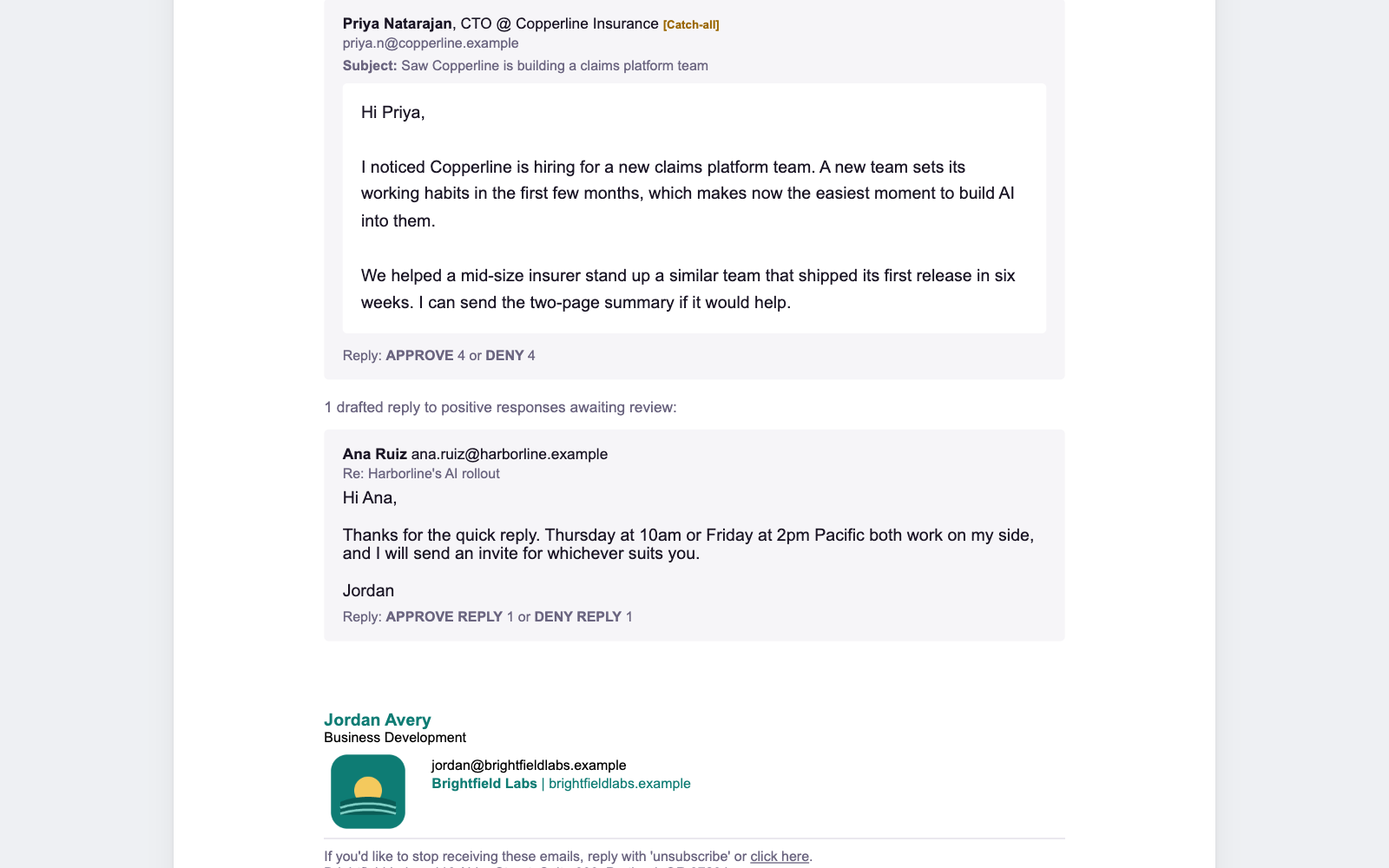
The operator can approve or deny individual messages by replying directly to the email. For example, a reply can approve selected drafts and deny another without opening a separate application or editing individual records.
Approved messages move into the sending workflow and are delivered through Outlook. Approval is required for both initial outreach and follow-ups by default. Automatic approval is configurable, but disabled in the standard setup.
Sending limits, pacing, duplicate checks, and pause controls govern execution. Each send is recorded, and the corresponding prospect's status and touch history are updated.
Replies, bounces, and follow-ups
The pipeline continues working after the initial message is sent. It tracks each prospect's position in the sequence, follow-up timing, and communication history.
It also monitors the Outlook inbox and processes incoming replies:
- Positive responses: The prospect is marked for human attention, and the operator receives a Telegram alert to take over the conversation.
- Negative responses: The prospect's status is updated so the sequence does not continue as though no reply had arrived.
- Unsubscribes: The address is added to suppression records and excluded from future outreach.
- Out-of-office replies: The prospect is moved into a pending state for appropriate follow-up handling.
- Delivery failures: Non-delivery reports are matched to prospect records, and bounced addresses are excluded from future draft generation.
When an address bounces, the system can attempt recovery using alternate address patterns within defined limits. A recovered address returns to the normal approval process; it is not automatically sent another message. If recovery fails, the record remains flagged for manual correction.
The operator handles the conversations that require judgment and relationship-building. The system handles the tracking and administrative work around them.
Records that stay accountable
The pipeline maintains prospect records and a history of outreach activity, including touch progression, follow-up timing, replies, delivery status, and suppression state.
It also checks its records against Outlook Sent Items, the outreach log, and its sending ledger. Reconciliation routines identify missing records, mismatched counts, and discrepancies between recorded activity and actual email delivery.
Daily health checks and integrity reports surface operational problems. Telegram alerts bring failures and important exceptions to the operator rather than requiring constant manual inspection.
The result is a record of more than how many emails were sent. The system tracks where prospects stand in the sequence, what communication has occurred, and which records or delivery issues need attention.
Marketing operations
Marketing follows the same operating principle: the operator owns the company's voice and content, while the system coordinates the recurring work around publishing.
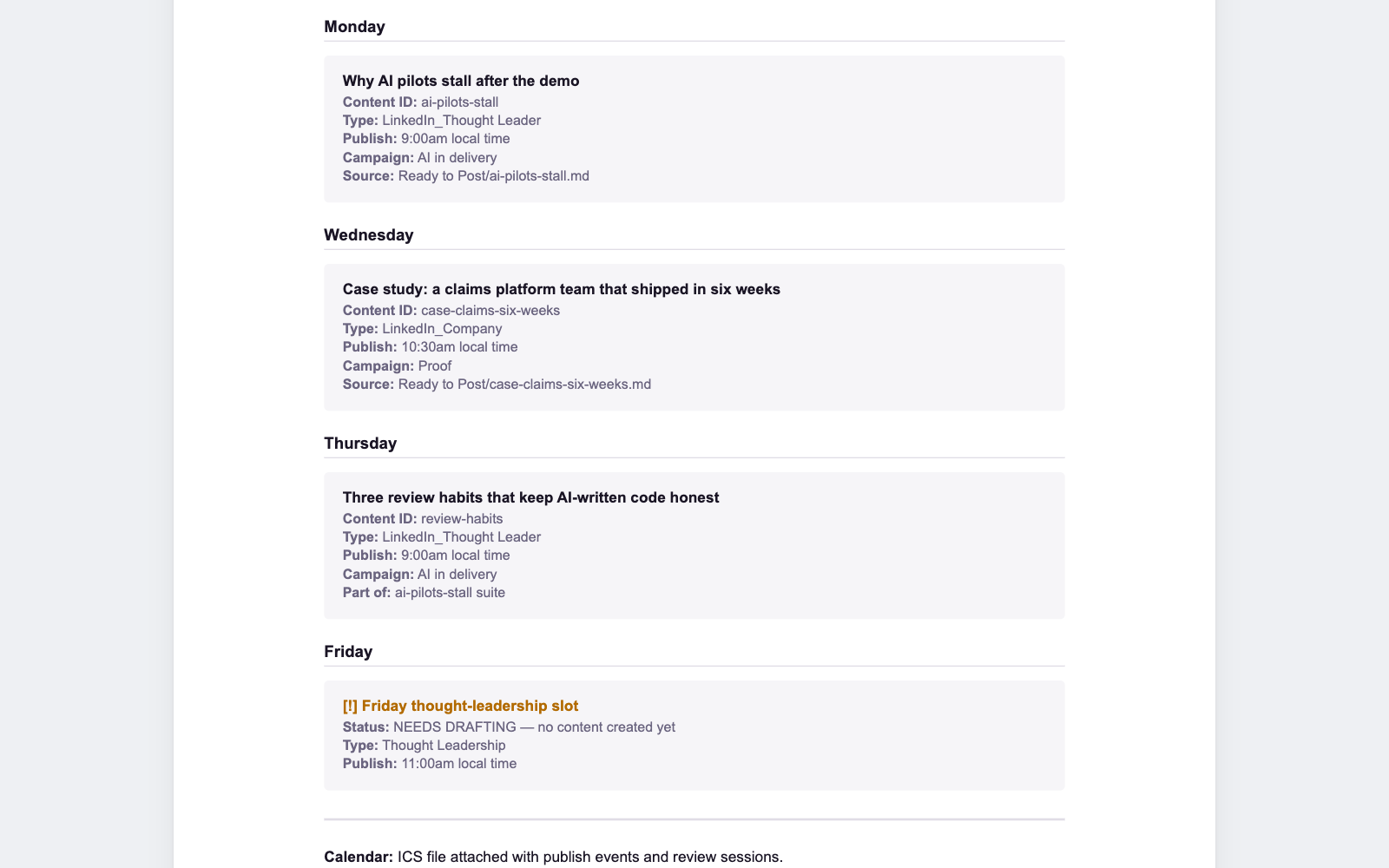
The operator develops content and maintains the content queue. The system organizes that queue using content type, priority, publishing phase, and scheduled date. It prepares weekly publishing plans using the configured cadence and scheduling preferences.
The operator reviews the proposed plan and remains responsible for publishing approved posts to LinkedIn. Once a post is live, its publication URL is recorded so the system can maintain a history of published content and incorporate activity into reporting.
The workflow also supports posting schedules, weekly adjustments, content phasing, and pause controls. Published-content records are maintained separately from the working queue, preserving a record of what has gone live.
This keeps content planning and publishing activity connected without handing the company's editorial decisions or public voice to an automated process.
Human oversight
The system is designed around clear responsibilities and intervention points.
The operator owns:
- Prospect sourcing, selection, and business development priorities.
- Company direction and decisions about which relationships to pursue.
- Outreach research, messaging, and email templates.
- Marketing topics, content, and company voice.
- Review and approval of outreach drafts and content plans.
- Publishing to LinkedIn.
- Responses to positive replies and relationship management.
- Operating limits, workflow changes, and decisions to pause activity.
The system handles:
- Maintaining prospect records and pipeline state.
- Coordinating the five-touch outreach sequence.
- Selecting established message variants and preparing prospect-specific drafts.
- Presenting messages for review and processing approval decisions.
- Sending approved email through Outlook.
- Tracking follow-ups and monitoring inbox activity.
- Classifying replies and updating prospect status.
- Processing unsubscribe and bounce records.
- Tracking delivery, touch history, and publishing activity.
- Reconciling operational records and preparing reports.
- Alerting the operator to important replies, failures, and exceptions.
The operator can change sending limits, adjust approval behavior, pause individual workflows or broader activity, and control the operating timezone. These controls make it possible to intervene without dismantling the system.
The scheduled workflows run in the operator's environment, with the host responsible for keeping the scheduler available. The system is designed to handle recurring work in the background while leaving the operator in control of when and how it runs.
The result
Business development still requires someone who understands the company, knows which opportunities matter, communicates with credibility, and builds relationships. OliverOperate doesn't attempt to automate those responsibilities.
It removes much of the coordination around them: preparing and approving outreach, maintaining follow-up schedules, sending messages, monitoring replies, handling delivery exceptions, keeping records aligned, and organizing recurring marketing activity.
The documented operating model estimates approximately 10–15 minutes of routine weekly interaction for scheduled reviews, approvals, publishing, and reporting. That estimate excludes creating content, sourcing prospects, and personally handling meaningful replies.
The result is a more consistent growth operation, with the person remaining the voice and decision-maker and the system keeping the work moving.
What it sends
The screenshots are the emails OliverOperate sends, rendered by its own email code for an invented company, Brightfield Labs. The people, companies and numbers in them are made up.
Screenshots


Stack
Node.js · Google Sheets · Microsoft Graph / Outlook · Supabase · Cloudflare Workers · Telegram · Cron
Access
Private repository.